
Makeup
The Fascinating Waveguide Technology Inside Meta’s Ray-Ban Display Glasses
Jun
Smart glasses have been “the next big thing” for so long that the phrase now deserves its own tiny folding chair. Yet Meta’s Ray-Ban Display glasses make the category feel unusually real. They do not try to turn your face into a spaceship cockpit. Instead, they place a small, private, full-color display inside the right lens, pair it with AI, and let you control it with a wrist-worn neural band. The result is less “sci-fi helmet” and more “regular glasses that secretly passed engineering school.”
The most fascinating part is not the camera, the speakers, or even the AI assistant. It is the waveguide technology hidden in the lens. A waveguide is the optical system that moves light from a tiny projector in the frame into your eye, while still letting you see the real world. In Meta’s Ray-Ban Display glasses, this technology makes messages, translations, directions, captions, and visual AI responses appear as a glanceable overlay without forcing you to stare at a phone.
That sounds simple until you remember that eyeglass lenses are thin, transparent, curved, socially visible, and expected to sit on a human nose all day without starting a rebellion. Fitting a usable display into that space is an optical juggling act. Meta’s product shows how far smart glasses display technology has come, and why waveguides may become the quiet hero of the next computing platform.
What Are Meta’s Ray-Ban Display Glasses?
Meta Ray-Ban Display glasses are AI-powered smart glasses created through Meta’s partnership with Ray-Ban and EssilorLuxottica. Unlike earlier Ray-Ban Meta models that focused on audio, camera capture, and voice-based Meta AI, the Display version adds a high-resolution screen built into the right lens. This screen is designed for short interactions: checking a message, previewing a photo, reading live captions, seeing walking directions, or getting a quick visual response from Meta AI.
The glasses look like a slightly thicker take on Ray-Ban’s familiar lifestyle frames rather than a bulky mixed reality headset. That matters. Wearable technology has a brutal fashion test: people may forgive a laptop for being ugly, but they are much less forgiving when the computer is sitting directly on their face. Meta’s strategy is clear: make the display useful, but keep the product close enough to normal eyewear that people might actually wear it outside a tech conference.
Meta also pairs the glasses with the Meta Neural Band, a wrist device that uses electromyography, or EMG, to detect tiny muscle signals from hand and finger movements. In plain English, your fingers make small gestures, the band reads the electrical activity from your wrist, and the glasses treat those signals as commands. It is a neat way to avoid poking the frame, shouting voice commands in public, or performing awkward air-taps like you are trying to negotiate with an invisible mosquito.
Waveguide Technology Explained Without the Headache
A waveguide is a transparent optical pathway that guides light through a lens and redirects it toward the eye. Imagine shining a flashlight into the edge of a sheet of glass and then using tiny mirrors or optical structures inside that glass to steer the light exactly where it needs to go. That is the general idea, though the real engineering is dramatically more precise.
In smart glasses, the display image begins in a miniature light engine or micro-projector, usually located in the arm of the frame. That projector creates a tiny image. The waveguide then carries that image through the lens and releases it toward the wearer’s eye. The wearer sees digital information floating in their view, while the lens remains mostly transparent.
This is different from simply mounting a little screen in front of the eye. A traditional screen would be bulky, obvious, and probably make the wearer look like they lost a fight with a calculator. A waveguide allows the display to be embedded into eyewear more elegantly. It preserves the see-through function of glasses while adding a private visual layer.
Reflective Geometric Waveguides: The Clever Glass Trick
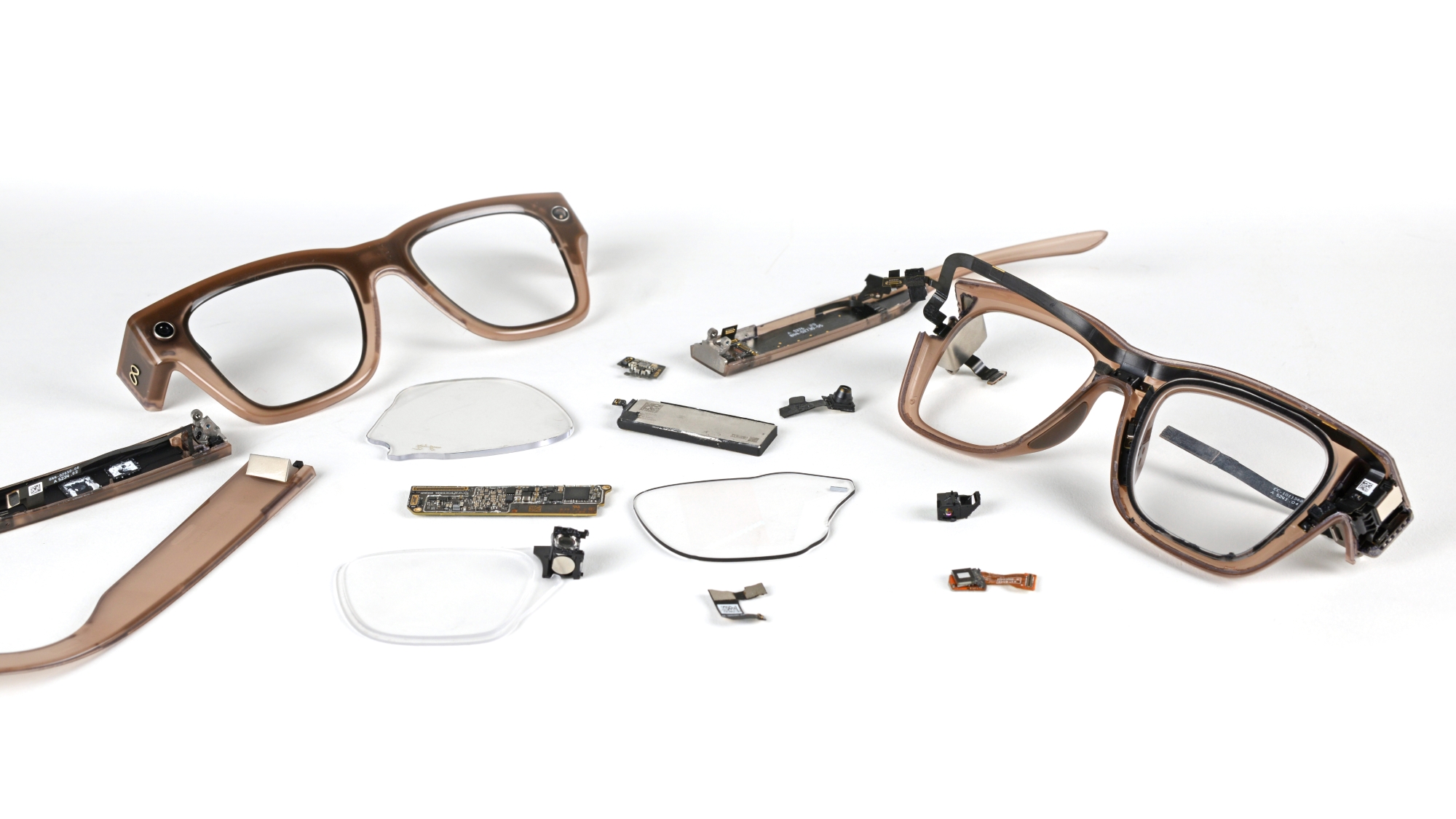
Reporting and teardown analysis indicate that Meta’s Ray-Ban Display glasses use a reflective geometric waveguide system. This kind of waveguide relies on carefully placed partially reflective mirrors or mirror-like structures inside the lens to bounce light toward the eye at controlled angles. The system differs from diffractive waveguides, which use microscopic grating patterns to bend and split light.
The advantage of a reflective geometric waveguide is visual cleanliness. Diffractive systems can suffer from rainbow artifacts, color unevenness, and visible “eye glow,” where outside observers may notice light leaking from the lens. Reflective waveguides can reduce those issues by using mirror-based optics to manage light more directly. In everyday terms, the wearer gets a cleaner image, and people nearby are less likely to see a tiny disco party happening on the lens.
This privacy angle is important. Meta’s display is meant to show personal information such as messages, captions, and navigation. A smart glasses display that strangers can read over your shoulder would be awkward; one that strangers can read from your face would be comedy with legal paperwork. By directing light primarily toward the wearer’s eye, the waveguide helps keep the display private and socially acceptable.
The LCoS Light Engine: A Tiny Projector With a Big Job
The waveguide is only half the story. The image has to come from somewhere, and in Meta’s Ray-Ban Display glasses that job is handled by a tiny projection system in the right arm of the frame. Teardown coverage has pointed to an LCoS, or liquid crystal on silicon, microdisplay approach. LCoS technology reflects light from colored LEDs off a silicon-backed liquid crystal panel to form an image.
LCoS is attractive for smart glasses because it can produce sharp images in a compact package. Meta’s display is reported as a 600 x 600 pixel full-color display with a small field of view designed for glanceable information. That may sound modest compared with a phone screen, but smart glasses do not need to show a movie theater on your eyebrow. They need to show a readable message, a map arrow, a translation line, a camera preview, or a useful AI answer in the right moment.
Brightness is another key challenge. Outdoor smart glasses must fight sunlight, reflections, lens tint, and the simple fact that the real world is rude enough to be very bright. Meta has promoted high brightness for the in-lens display, helping it remain visible in daylight. That brightness must be balanced against heat, power consumption, battery life, and comfort. In wearable tech, every extra watt eventually becomes a forehead complaint.
Why the Display Sits Off to the Side
Meta’s display is not designed to sit permanently in the center of your vision. It is positioned off to the side, making it more like a glanceable dashboard than a full augmented reality canvas. That choice is practical. A central display could interfere with eye contact, walking, driving awareness, or simply enjoying the world without feeling like a notification billboard has moved into your skull.
The side placement also reflects the current limits and purpose of the device. These glasses are not trying to deliver full spatial AR with wide-field holograms pinned to every object in a room. They are built for quick, useful interactions: read the text, check the direction, frame the photo, answer the message, then get back to life. That is a more realistic near-term use case for consumer AI glasses.
This design philosophy may be why the product feels important. Instead of asking users to replace reality, it tries to reduce the number of times they need to pull out a phone. In the long run, the winning smart glasses may not be the ones that scream “future” the loudest. They may be the ones that quietly remove ten small phone checks per day.
What the Waveguide Makes Possible
Private Messages and Notifications
One obvious use is private messaging. Instead of lifting a phone, unlocking it, opening an app, and accidentally spending six minutes watching a raccoon steal cat food, a user can glance at the in-lens display. The glasses can show texts, multimedia messages, and app notifications in a way that is fast and discreet.
Live Captions and Translation
Live captions may be one of the strongest reasons to put a display in glasses. Audio-only translation can be useful, but it can also compete with the real voice of the person speaking. Text captions in the lens let users read along while still listening naturally. In noisy environments, classrooms, travel situations, or conversations across languages, that visual layer can be genuinely helpful.
Walking Navigation
Walking directions are another perfect smart glasses use case. Looking down at a phone while navigating a city is not ideal. It is also a wonderful way to meet a lamppost personally. A small map or turn arrow in the lens can keep the user oriented while their eyes remain mostly up.
Camera Preview and Framing
Earlier camera glasses could capture hands-free photos and videos, but framing was partly guesswork. A built-in display changes that. Users can preview the shot, adjust composition, and capture from their point of view without pulling out a phone. For creators, travelers, parents, or anyone trying to record a moment without turning it into a full phone ritual, that matters.
The Neural Band Completes the Interface
The waveguide gives the glasses visual output, but the Meta Neural Band gives them a more natural input method. Voice commands are useful, but they are not always socially comfortable. Touch controls are simple, but tapping the side of your glasses all day can feel clumsy. EMG gesture control creates a quieter alternative.
The band detects tiny muscle signals associated with finger gestures. Users can select, scroll, go back, or interact with the display through subtle movements. The beauty of this approach is that it keeps interaction low-profile. You can respond to a message or move through a menu without turning your face into a public demonstration booth.
This combination of waveguide display and neural input is what makes the product more than camera glasses with a bonus screen. It becomes a small wearable computer system: eyes for visual output, wrist for input, AI for context, and the phone quietly demoted to backup singer.
Why This Technology Is So Hard to Build
Smart glasses are an engineering nightmare wearing designer frames. The display must be bright but power-efficient, sharp but tiny, private but readable, transparent but optically active. The frame must hold cameras, speakers, microphones, batteries, wireless chips, processors, sensors, and thermal management. Then it must survive normal life: sweat, sunlight, pockets, bags, accidental drops, and the mysterious crushing power of sitting on your own glasses.
Waveguides add another layer of difficulty. Manufacturing high-quality transparent optics with embedded reflective structures is expensive and precise. Even small imperfections can affect brightness, color uniformity, image clarity, or eye comfort. The lens must also work with prescriptions, tints, coatings, and style expectations. That is why the glass itself may be the most impressive component in the product.
Repairability is another concern. Early smart glasses often require tightly integrated construction, which can make battery replacement and repairs difficult. That is not unusual for first-generation wearable devices, but it matters for sustainability and long-term ownership. If smart glasses are to become everyday products, future versions will need to be easier to service, fit, customize, and recycle.
Meta Ray-Ban Display vs. Full AR Glasses
It is important to call Meta’s Ray-Ban Display glasses what they are: advanced AI glasses with a heads-up display, not full immersive AR glasses. They do not place persistent 3D objects throughout your environment in the way more ambitious AR headsets attempt to do. Their field of view is smaller, the display is monocular, and the experience is built around quick visual tasks.
That limitation may actually be a strength. Full AR glasses remain difficult because they require wider displays, stronger processors, more sensors, deeper spatial mapping, larger batteries, and heavier thermal design. Meta’s approach chooses a narrower but more practical target. Instead of promising a dragon on your desk, it promises that you can read a message, follow directions, translate a conversation, and preview a photo without grabbing your phone. Frankly, most people need the second thing more often than the dragon.
The Consumer Impact: Why Waveguides Could Matter
The bigger story is not just Meta’s product. It is the direction of personal computing. Phones made computing portable. Smartwatches made it glanceable. Smart glasses may make it contextual. A display in your line of sight can deliver information at the moment you need it, while cameras and AI can interpret what you are looking at.
That creates possibilities beyond convenience. Accessibility tools could become more immediate. Captions could help people follow conversations. Visual AI could identify objects, summarize signs, or guide users through tasks. Language translation could become less awkward. Navigation could become safer for pedestrians. The waveguide is the optical doorway that allows all of this to happen without blocking the world.
Of course, privacy and social trust will decide whether the category grows. Cameras on glasses make people cautious, and rightly so. Clear capture indicators, responsible data handling, visible controls, and strong user education are essential. Smart glasses must earn public comfort, not assume it. The technology is impressive, but trust is the real operating system.
Hands-On Style Experience: What Using Waveguide Smart Glasses Feels Like
Imagine walking through a busy downtown area with your phone in your pocket instead of glued to your hand. You ask for directions to a coffee shop, and a small visual cue appears in the right lens. It does not cover the whole street. It does not shout for attention. It simply waits where your eyes can catch it. You glance, understand the next turn, and keep walking. That is the kind of experience waveguide smart glasses are designed to create: less screen time, not more screen prison.
The first few minutes would probably feel strange. A digital image floating inside one lens is not exactly something human evolution prepared us for. Our ancestors had many concerns, but “monocular LCoS display alignment” was not one of them. Still, the brain adapts quickly when the information is useful. A message preview appears, your hand makes a small gesture, and the Neural Band turns that movement into a command. The interaction feels less like using a gadget and more like learning a new tiny body language.
The best experiences would likely be the ones where the display saves you from phone friction. Cooking is a good example. Step-by-step instructions in the lens could keep your hands free and your recipe visible while your phone stays safely away from flour, oil, and whatever mysterious sauce has chosen violence today. Travel is another strong case. Live translation captions could make a conversation easier to follow, while walking directions could guide you through unfamiliar streets without forcing you to stop every block.
For creators, the camera preview could be surprisingly valuable. Point-of-view capture is fun, but without a viewfinder it can feel like filming with optimism instead of composition. Seeing a quick preview in the lens helps frame a shot while keeping the moment natural. Parents recording a birthday, cyclists capturing a route, or journalists documenting an event could all benefit from that small visual confirmation.
There would also be annoyances. Battery anxiety does not disappear just because the computer moved to your face. The display is small, so it is not ideal for long reading. The frame is thicker than normal eyewear, and not everyone wants to explain their glasses at dinner. Some users may notice the monocular effect more than others. App support will matter too. A brilliant display is less exciting if the software ecosystem feels like a tiny airport with two gates and one snack machine.
Still, the experience points toward a believable future. The magic is not that the glasses replace your phone overnight. They will not. The magic is that they can remove small interruptions from ordinary life. Every time you avoid pulling out your phone for a simple task, the glasses justify their existence a little more. That is where waveguide technology shines: not as a fireworks show, but as a quiet optical assistant that appears when needed and disappears when the real world deserves the spotlight.
Conclusion: The Lens Is the Real Computer
Meta’s Ray-Ban Display glasses are fascinating because they show a practical path toward everyday smart eyewear. The waveguide display is not just a component; it is the reason the product can exist in a familiar glasses form. By channeling light through the lens and directing it privately toward the eye, the system turns ordinary-looking eyewear into a subtle visual interface.
The technology is still early. The display is small, the price is premium, repairability is limited, and the software ecosystem will need to mature. But the foundation is compelling. Reflective waveguides, compact LCoS projection, high-brightness optics, AI features, and EMG wrist control together create something that feels less like a gimmick and more like the beginning of a new device category.
If smart glasses eventually become mainstream, people may not remember the exact resolution, field of view, or optical architecture of this generation. They will remember the moment glasses stopped being only something you looked through and started becoming something that could quietly look out for you. That is the fascinating promise inside Meta’s Ray-Ban Display glasses: a tiny display, a very clever lens, and a future that is finally learning how to fit on a human face.
Note: This article is written for web publication and synthesizes publicly available product information, technical reporting, teardown analysis, and hands-on impressions into original explanatory content.

