
Body Care
Making WiFi Sound Like Dial-Up Internet
Jun
Note: This article is written for educational, nostalgic, and maker-friendly purposes. Any network monitoring discussed here should be done only on devices and networks you own or have clear permission to test.
Introduction: The Internet Used to Scream Before It Worked
Once upon a time, getting online was not silent. It was a performance. You clicked “Connect,” waited like a pilgrim at the gates of cyberspace, and then your modem unleashed a glorious mechanical opera: beeps, hisses, chirps, screeches, and a final rush of static that sounded like a robot arguing with a fax machine inside a tin can.
Today, WiFi is fast, invisible, and mostly polite. Your laptop joins a network without asking the room to listen. Your phone streams videos while pretending nothing magical is happening. But that silence also means we lost something weirdly charming: the feeling that the internet was an event.
That is why the idea of making WiFi sound like dial-up internet is so delightful. It is not about bringing back slow speeds, busy phone lines, or the family member who picked up the landline and destroyed your download at 97 percent. It is about turning modern wireless traffic into sound, transforming invisible data into a nostalgic audio experience.
At its heart, this project sits at the intersection of networking, electronics, sound design, and digital archaeology. It asks a wonderfully strange question: if WiFi had a voice, would it sound like the 1990s?
What the Dial-Up Sound Actually Was
Before broadband and WiFi became ordinary, dial-up modems used telephone lines to connect computers to internet service providers. A modem’s job was right there in the name: modulator-demodulator. It converted digital computer data into analog tones that could travel over voice-grade phone lines, then converted incoming tones back into digital data.
The famous dial-up sound was not random noise. It was a handshake. Two modems were negotiating how they would communicate: testing the line, agreeing on speed, selecting modulation methods, and synchronizing the connection. Those shrill tones were not decorative. They were the sound of machines politely asking, “Can you hear me now?” in a language only engineers and haunted printers could love.
Once the connection was established, the modem typically muted the speaker. The data still moved as modulated signals, but users no longer heard it. That opening burst became iconic because it marked the threshold between offline life and the early web. It was the audio equivalent of opening a creaky door into the internet.
Why WiFi Does Not Naturally Make Dial-Up Sounds
Modern WiFi does not work like dial-up. WiFi uses radio-frequency signals far above the range of human hearing. You cannot simply “listen” to WiFi the way you could hear a modem through a speaker. The energy is there, but it lives in a different part of the spectrum. Human ears are not built to hear 2.4 GHz or 5 GHz radio waves, which is probably for the best. Imagine your apartment screaming every time someone streamed a movie.
WiFi also uses complex digital communication methods designed for efficiency, speed, and reliability. Instead of phone-line audio tones, wireless devices exchange packets using IEEE 802.11 standards. These packets include management frames, control frames, and data frames. Some help devices discover and join networks. Some coordinate access to the wireless medium. Others carry the actual payloads that make websites, video calls, cloud backups, and late-night snack delivery tracking possible.
So when people talk about making WiFi sound like dial-up, they are usually not playing the raw WiFi signal through a speaker. They are sonifying network activity. In plain English: they are taking packet data and mapping it to audio characteristics such as pitch, amplitude, rhythm, or noise texture.
The Basic Idea: Turning Packets Into Sound
A WiFi-to-dial-up-style project usually follows a simple concept. First, a device observes wireless traffic. Next, software extracts data from packets or packet metadata. Then a microcontroller or audio system converts those values into sound. Finally, a speaker plays the result as a retro-inspired stream of chirps, squawks, and static.
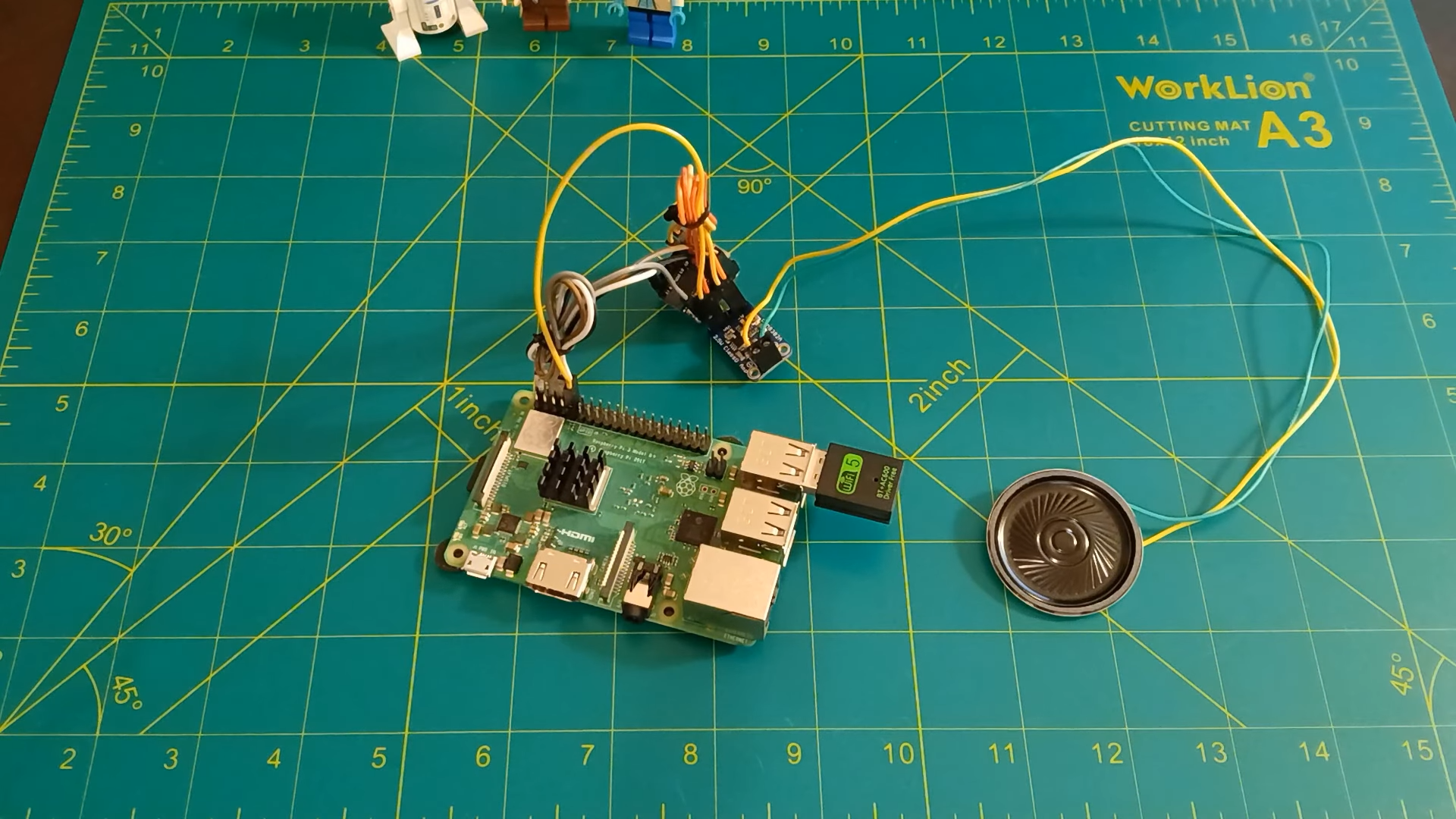
One popular maker approach uses a Raspberry Pi with a secondary USB WiFi adapter to monitor traffic from a target device. The captured packet information is sent to a small microcontroller, such as an Adafruit QT Py. The microcontroller changes an audio waveform based on the incoming data, then sends that signal through a digital-to-analog converter and a small amplifier into a speaker.
The result is not a perfect recreation of a 56K modem handshake. Instead, it is a creative translation. Real WiFi traffic becomes an audio sculpture that reminds listeners of dial-up internet. Think of it as a tribute band: not the original modem, but it knows the song well enough to make your inner 1998 self look up from a beige desktop computer.
What Hardware Is Typically Used?
A typical build for making WiFi sound like dial-up internet can include:
1. A Raspberry Pi or Similar Single-Board Computer
The Raspberry Pi acts as the packet-handling brain. It can run scripts, work with networking tools, and pass selected packet data to another device. A Raspberry Pi 3 or newer model is often enough for hobby-level experiments.
2. A USB WiFi Adapter That Supports Monitor Mode
Monitor mode is important because it allows a wireless adapter to observe 802.11 traffic more broadly than normal managed mode. Not every adapter supports it well, so choosing compatible hardware matters. For ethical and legal reasons, this should be used only on your own network or in a controlled lab environment.
3. A Microcontroller With Audio Output Capability
A small board such as an Adafruit QT Py can receive packet-derived values and use them to shape an audio signal. Boards with a digital-to-analog converter are especially useful because they can create smoother analog output than basic digital pin toggling.
4. A Small Audio Amplifier
Microcontrollers are not designed to drive speakers directly at satisfying volume. A compact Class D amplifier can boost the signal efficiently, making the sound loud enough to enjoyor annoy everyone within earshot, depending on your household’s tolerance for nostalgia.
5. A Speaker
A small 8-ohm speaker is enough for the classic “tiny gadget making questionable noises” experience. You do not need a home theater system unless your goal is to make the entire neighborhood relive 1997.
How the Sound Mapping Works
The magic is in the mapping. Packet data is digital, but sound needs patterns over time. A project might take values such as packet size, packet frequency, source or destination activity, timing gaps, or byte values and convert them into changes in sound.
For example, larger packets might produce louder bursts. Frequent packets might create rapid clicking or buzzing. Different packet types could trigger different tones. Randomized modulation can make the output feel more like classic dial-up chaos rather than flat static.
This is where technical design becomes artistic design. If you map the data too literally, the result may sound like dull noise. If you add too much artificial variation, the sound may become nostalgic but disconnected from real network activity. The sweet spot is somewhere in between: real data driving a deliberately retro audio personality.
Dial-Up Accuracy vs. Dial-Up Vibe
There is an important distinction between recreating dial-up accurately and creating a dial-up-inspired sound. Real dial-up modem audio followed specific communication protocols. The tones represented negotiation, training, carrier detection, and modulation behavior. It was functional.
WiFi sonification is usually aesthetic. The sound does not help your laptop connect. It does not make the network faster. It does not give your router a charming vintage soul, although we can dream. Instead, it translates modern packet behavior into a familiar sound palette.
That means the best question is not, “Does this sound exactly like a real modem?” The better question is, “Does this make invisible internet activity feel alive?” When the speaker crackles as a webpage loads or chatters during a file transfer, the answer is often yes.
Why This Project Is More Than a Joke
At first glance, making WiFi sound like dial-up internet seems like a novelty. And yes, it absolutely is a novelty. It belongs proudly in the category of inventions that make people say, “That is ridiculous,” followed immediately by, “I want one.”
But there is real educational value here. The project helps people understand that networks are active systems. Every video stream, software update, smart speaker request, and browser tab produces traffic. WiFi may feel like invisible magic, but it is made of structured communication happening constantly.
By converting network activity into sound, makers create a sensory bridge between abstract data and human perception. Suddenly, packets are not just numbers in a capture window. They have rhythm. They have texture. They have the nervous energy of a squirrel trapped in a synthesizer.
Privacy and Security Considerations
Any project involving packet capture must be handled carefully. Monitoring traffic on networks you do not own or have permission to analyze can violate laws, policies, and basic digital manners. Even on your own network, it is wise to avoid storing sensitive packet contents. For a sound project, you generally do not need to inspect private data. Packet timing, size, and basic metadata can be enough to create an interesting audio output.
A responsible design should focus on activity patterns rather than personal content. The goal is not to spy on messages, passwords, or browsing details. The goal is to make your WiFi go “skrrreee-bloop-hiss” when data moves. That is art, not surveillance.
Best Practical Uses
Does a WiFi dial-up sound machine solve an urgent modern problem? Not exactly. But it does have some fun and useful applications.
Teaching Networking Concepts
Students can hear the difference between idle and busy network periods. Streaming video, loading websites, and downloading files can produce different sonic patterns. This turns network traffic into something memorable.
Maker Fairs and Retro Tech Exhibits
A working WiFi-to-dial-up sound box is perfect for demonstrations. It attracts attention, sparks conversation, and makes older visitors grin while younger visitors ask, “Wait, the internet used to sound like that?”
Ambient Network Awareness
With careful tuning, the sound could act as a playful network activity monitor. A quiet speaker suggests low activity; rapid chatter suggests heavy traffic. This is not a replacement for professional monitoring tools, but it is much funnier.
Digital Art Installations
Artists can use live network traffic as a generative sound source. The room becomes an instrument, and every connected device becomes part of the performance. Somewhere, a router becomes nervous.
How to Make It Sound Better
The difference between “interesting retro sound” and “unbearable electronic mosquito” comes down to sound design. A good WiFi dial-up project should shape the audio intentionally.
First, limit the volume. Dial-up nostalgia is best served at conversation level, not emergency siren level. Second, smooth the data mapping so the output has motion rather than harsh randomness. Third, use frequency ranges that resemble modem tones without becoming painfully sharp. Fourth, add short bursts, pauses, and changing patterns. Dial-up was memorable because it had a sequence. It did not simply scream forever, although emotionally it sometimes felt that way.
You can also create modes. A “classic handshake” mode could play a short modem-inspired intro when a device joins the network. A “traffic mode” could produce static-like audio during active data transfer. A “museum mode” could exaggerate everything for visitors who want the full nostalgic drama.
What This Says About Modern Internet Culture
Silent WiFi is convenient, but it also hides the process of connection. Modern technology often works best when it disappears. That is good design, but it can make the internet feel less physical and less understandable.
Dial-up was slow and inconvenient, but it made connection feel tangible. You heard the attempt. You waited for success. You knew when something failed. The sound was annoying, yes, but it gave the internet a body.
Making WiFi sound like dial-up brings back that physical sense of connection. It reminds us that every “instant” action online still depends on layers of hardware, protocols, radio signals, packets, and electrical decisions happening at absurd speed. The modern web may feel weightless, but underneath it is a busy machine.
Common Mistakes to Avoid
Trying to Capture Everything
You do not need every packet. Capturing too much can overload the system and produce boring noise. Selective sampling often creates better sound.
Ignoring Legal Boundaries
Only monitor networks and devices you are allowed to test. A cool project stops being cool when it becomes unauthorized surveillance.
Making the Sound Too Random
Randomness can add character, but too much randomness disconnects the audio from real WiFi activity. Let the network drive the performance.
Forgetting the Listener
Dial-up sound is funny in short bursts. In long sessions, it can become a tiny electronic goblin. Add volume control, mute options, and mercy.
Experience Notes: What It Feels Like to Make WiFi Sound Like Dial-Up Internet
Building or testing a WiFi dial-up sound project is a strangely emotional experience. At first, it feels like a normal maker project: gather parts, check compatibility, connect boards, test audio output, and wonder why one cable has chosen betrayal today. But the first time the speaker reacts to network traffic, the whole thing changes. Suddenly, your invisible WiFi has a personality.
The most surprising part is how alive the network feels. When nothing obvious is happening, there may still be little clicks and whispers. Devices check in. Apps refresh. Smart gadgets perform their tiny rituals. Then you open a webpage, and the speaker wakes up like an old modem that had three cups of gas-station coffee. A video stream creates a different texture. A file download can become a thick rush of static. Even simple browsing starts to feel theatrical.
There is also a strong nostalgia effect. Anyone who grew up with dial-up will recognize the emotional shape of the sound, even if the technical details are different. It brings back memories of waiting, listening, and hoping the connection would hold. It recalls the era when going online required patience and possibly a family agreement not to use the phone. The project does not make modern internet slower, but it does make it feel less invisible.
For younger users, the reaction is different but just as fun. They often treat the sound like a strange artifact from a lost civilization. Explaining that people once listened to a modem negotiate internet access over a telephone line can sound like describing a ritual involving candles and floppy disks. The project becomes a conversation starter about how fast technology changes and how quickly ordinary experiences become historical oddities.
From a practical standpoint, the biggest challenge is making the audio pleasant enough to hear for more than a minute. Raw packet-driven sound can become harsh. The trick is to design the output like an instrument, not just a warning buzzer. Short bursts, controlled pitch ranges, softened transitions, and occasional silence make a huge difference. Silence is especially important. Without it, the sound becomes less “retro internet” and more “possessed smoke detector.”
The project also changes how you think about WiFi. Most people treat wireless connectivity as a simple on/off condition: connected or not connected. Hearing traffic reveals that connectivity is continuous and dynamic. There are bursts, lulls, background exchanges, and sudden storms of activity. It makes the network feel less like a utility and more like a living system.
In the end, making WiFi sound like dial-up internet is not about efficiency. It is about curiosity. It is about taking something modern, silent, and invisible and giving it a goofy, nostalgic voice. The project is part science lesson, part art installation, part retro comedy. It reminds us that technology does not have to be useful in the narrowest sense to be meaningful. Sometimes the best project is the one that makes people laugh, learn, and say, “I cannot believe this works.”
Conclusion: The Beautiful Noise of a Connected World
Making WiFi sound like dial-up internet is a playful reminder that the internet has always had a physical side. Dial-up made that obvious through sound. WiFi hides it behind radio waves, chips, antennas, packets, and protocols. By turning wireless traffic into audio, makers reconnect us with the machinery behind the magic.
This project will not improve your download speed, reduce latency, or make your router respect you more. But it can teach networking concepts, celebrate retro computing, and turn everyday internet use into an audible performance. It is a love letter to the noisy past and a clever reinterpretation of the silent present.
In a world where technology often tries to disappear, there is something wonderful about making it loud again. Not always, of course. Nobody wants their smart fridge shrieking at 2 a.m. But as a controlled experiment, a classroom demo, or a maker project, WiFi dial-up sound is weird in exactly the right way.

