
Beauty Unlocked
Watch A Web Page Fetch Itself Over TLS, Complete With Commentary
Jun
There are web demos that teach you something, and then there are web demos that make your brain lean forward in its chair. “Watch A Web Page Fetch Itself Over TLS, Complete With Commentary” belongs firmly in the second group. It sounds like a magician’s trick: a page opens in your browser, presses a metaphorical button, reaches across the internet, fetches its own source code over HTTPS, and then calmly explains the whole secure connection byte by byte like a tour guide with a pocket protector.
Behind the fun premise is a surprisingly practical lesson about how the modern web works. Every time you load a secure website, your browser and the server perform a carefully choreographed TLS handshake before real page data travels across the wire. Usually, this happens so quickly and quietly that users only notice the little padlock, assuming they notice anything at all. This demo drags the hidden machinery into the daylight and says, “Look! The internet is doing cryptographic gymnastics again.”
For developers, students, security beginners, and anyone who has ever wondered what HTTPS actually does, a self-fetching TLS page is more than a novelty. It is a microscope pointed at the most common security ritual on the web: proving identity, agreeing on encryption, protecting data, and delivering content without letting random network gremlins read or rewrite it.
What Does It Mean for a Web Page to Fetch Itself?
At the highest level, “fetching itself” means the page makes a request for its own URL. In a normal browser script, that might look conceptually similar to calling fetch(location.href). The page is already loaded, but it asks the network for the same resource again. That alone is amusing, like asking a mirror for a selfie, but the TLS version is where the real magic begins.
The demo known as “TLS, byte by byte” performs a live, annotated HTTPS request for its own source. Instead of letting the browser’s built-in networking stack hide everything, the page uses a JavaScript TLS implementation and a WebSocket proxy to reveal the raw conversation. The result is not merely “here is the HTML.” It is “here is how the secure tunnel was negotiated, here are the messages, here are the bytes, and yes, every tiny hexadecimal crumb has a job.”
That is the key difference between a normal fetch request and this educational experiment. In everyday JavaScript, the Fetch API gives developers a clean interface for requesting resources. You ask for a URL, wait for a response, and process the result. TLS happens below that comfortable abstraction. The self-fetching demo peels back the abstraction and turns the request into a narrated field trip through modern web security.
Why TLS Usually Feels Invisible
TLS, short for Transport Layer Security, is the protocol that helps secure HTTPS connections. When implemented correctly, it provides confidentiality, integrity, and authentication. In plain English, that means it helps keep outsiders from reading your traffic, helps prevent tampering, and helps confirm that your browser is really talking to the site it intended to reach.
Most users experience TLS as a tiny browser signal: a padlock icon, an https:// URL, or perhaps a scary warning page when something goes wrong. Underneath that calm interface is a handshake. The browser and server agree on a TLS version, negotiate cryptographic algorithms, verify certificates, and derive session keys that will encrypt the actual HTTP traffic.
Modern TLS is fast enough that this all feels instant. TLS 1.3 reduced handshake complexity compared with older versions and improved both security and performance. That speed is wonderful for users, but it makes the process harder to learn. It is like watching a chef prepare a five-course meal in half a second. Impressive, yes. Educational? Only if someone slows down the footage and adds labels.
The Byte-by-Byte Beauty of a TLS Handshake
The self-fetching page is fascinating because it restores the labels. It takes the handshake, the certificate exchange, the key agreement, and the encrypted application data, then gives each piece its moment under the spotlight. Instead of treating TLS as mysterious “security stuff,” the demo shows it as a structured series of messages.
ClientHello: The Browser Says Hello First
A TLS connection begins with the client sending a ClientHello message. Think of it as a polite but very technical opening line: “Hello server, here are the TLS versions I support, here are the cipher suites I can use, here is some random data, and here are a few extensions because the web is never allowed to be simple.”
This message is important because it starts the negotiation. The server cannot pick a secure communication style until the client explains what it supports. In a byte-level display, the ClientHello becomes more than a concept. You can see fields, lengths, identifiers, and values. It turns a vague handshake into a visible packet of intent.
ServerHello: The Server Chooses the Rules
The server replies with its own hello message. It selects compatible parameters and continues the process of establishing shared secrets. With TLS 1.3, many older handshake pieces have been simplified or removed, but the basic idea remains: both sides must agree on how to protect the conversation before the real HTTP response can travel safely.
In a narrated demo, this is where many learners have their first “aha” moment. TLS is not one giant blob of encryption sauce poured over a website. It is a negotiation. The client and server exchange structured messages that lead to shared keys. Those keys are then used for efficient symmetric encryption once the session is established.
Certificates: The Website Shows Its ID
A certificate is how the server proves it is authorized to represent a domain. Certificate Authorities, including automated providers such as Let’s Encrypt, help browsers decide whether a certificate should be trusted. The browser checks whether the certificate chain leads back to a trusted authority, whether the certificate matches the domain, and whether the certificate is valid.
This is where HTTPS earns much of its value. Encryption without authentication can still leave users talking securely to the wrong party, which is like whispering your secrets into the wrong ear. TLS certificates help solve that problem by connecting cryptographic keys to domain identity.
Session Keys: The Secret Sauce, Minus the Suspicious Jar
After negotiation and authentication, the client and server derive shared session keys. These keys protect the HTTP data that follows, including headers and bodies. The server does not simply send a reusable secret across the internet like a password on a sticky note. Instead, TLS uses key agreement and carefully designed cryptographic steps so both sides arrive at matching keys while eavesdroppers are left with digital confetti.
Once those keys exist, the page request can become encrypted application data. At that stage, the HTTP request and response are protected inside TLS records. The page is finally fetching itself, but now the audience understands the stagehands, ropes, pulleys, and trapdoors involved.
What the Fetch API Doesand What It Does Not Do
The Fetch API is the browser’s modern interface for requesting resources across the network. It replaced many older patterns based on XMLHttpRequest and gives developers a Promise-based way to work with requests and responses. You can fetch JSON, HTML, images, API responses, and other resources with a clean JavaScript syntax.
However, Fetch itself does not ask you to manually perform a TLS handshake. In ordinary web development, that would be exhausting and dangerous. Browsers handle TLS, certificate verification, connection reuse, caching rules, redirects, mixed content restrictions, CORS behavior, and plenty of other details that developers usually prefer not to rebuild before lunch.
The self-fetching TLS demo is educational because it does something intentionally unusual. It exposes the kind of detail that the browser normally abstracts away. This makes it less like a production recipe and more like a transparent engine model. You would not drive to the grocery store in a glass crankshaft demonstration, but you might finally understand how the car works.
Why This Demo Matters for Web Security
HTTPS is not just for login pages, banks, and shopping carts. Modern websites use HTTPS broadly because users deserve privacy and integrity across the entire browsing experience. Without HTTPS, network attackers can observe traffic, modify pages, inject scripts, or interfere with requests. That is bad when passwords are involved, and it is still bad when the page is “just content.” Nobody wants a coffee recipe rewritten by a malicious router into “add twelve cups of salt.”
Security guidance from organizations such as OWASP emphasizes TLS as a core protection for web applications. Correctly configured TLS helps protect data in transit and supports server authentication. HSTS, or HTTP Strict Transport Security, can further instruct browsers to use HTTPS automatically for a domain, reducing the chance that users are downgraded to insecure HTTP.
The demo also makes a developer-friendly point: abstractions are useful, but blind trust is not. Developers do not need to memorize every byte of every TLS record to build secure sites, but they should understand the broad flow. When something breaksexpired certificate, weak protocol, mixed content, broken redirect, invalid chainthe problem becomes much easier to solve if TLS is not a black box labeled “computer says no.”
A Specific Example: From Button Click to Self-Fetch
Imagine you open the demo page and click the button. First, the page prepares to request its own source. Instead of letting the browser hide the raw TLS details, it uses JavaScript and supporting infrastructure to make the process visible.
Next, a connection is established toward the server. The TLS handshake begins with the client-side code sending a ClientHello. The page commentary identifies the purpose of the bytes: protocol versions, random values, supported groups, signature algorithms, and other negotiation pieces.
The server responds. The page shows how the server’s messages fit into the handshake. Some bytes identify message types. Others define lengths. Others carry cryptographic material. To the untrained eye, it may look like alphabet soup after a thunderstorm. With commentary, it becomes a map.
Then certificate validation enters the story. The site must present proof that it belongs to the domain being requested. The browser world relies on chains of trust, where certificates are signed through intermediates up to trusted roots. This is why a certificate is not merely decoration; it is a structured claim about identity.
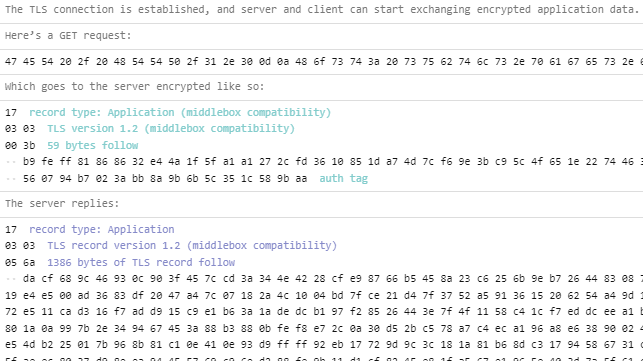
After key agreement, the connection switches into encrypted communication. The request for the page source travels through the protected channel. The server sends back the page content, and the demo annotates the response. At last, the web page has fetched itself. Narcissistic? Maybe. Educational? Absolutely.
Practical Lessons for Developers
Use HTTPS Everywhere
Every production website should use HTTPS. Free certificate automation has removed many old excuses. With tools and certificate authorities that support automated issuance and renewal, HTTPS is now a baseline expectation rather than a luxury add-on.
Avoid Mixed Content
A secure page that loads insecure HTTP resources can create browser warnings or broken functionality. Scripts, images, stylesheets, and API calls should be loaded over HTTPS. Mixed content is the web equivalent of locking the front door while leaving the dog door open and labeled “attackers welcome.”
Understand Certificates Before Panic Begins
Certificate errors are common, but they are not random curses from the browser goblin. They usually involve expiration, hostname mismatch, missing intermediate certificates, untrusted authorities, or local development setups. Knowing the certificate chain concept can turn a terrifying browser warning into a solvable checklist.
Remember That HTTPS Is Necessary, Not Magical
HTTPS protects traffic in transit, but it does not guarantee that a website is honest, bug-free, private by policy, or immune to phishing. A malicious site can still have a valid certificate. TLS proves you have a secure connection to a domain; it does not certify that the domain has good intentions, good taste, or a reasonable cookie banner.
Common Misunderstandings About TLS
One common misunderstanding is the phrase “SSL certificate.” In modern web security, TLS is the protocol actually used, while SSL is the older name that refuses to retire, like a printer from 2007 still occupying office space. The industry still says “SSL certificate” out of habit, but the secure web relies on TLS.
Another misunderstanding is that HTTPS only encrypts passwords. In reality, TLS protects the HTTP conversation, including headers and bodies after the handshake. This matters for pages, API requests, cookies, session identifiers, search queries, and other data that can reveal far more than users expect.
A third misunderstanding is that developers must personally implement TLS to understand it. Please do not casually roll your own cryptography for production. Educational implementations are excellent learning tools, but production security should rely on mature, reviewed libraries and well-maintained server configurations.
Experience: Watching a Web Page Fetch Itself Over TLS in Real Life
The first time you watch a page fetch itself over TLS, the experience is oddly humbling. Most of us use the web with the confidence of people ordering coffee: click, wait, receive. The browser loads a page, the page looks fine, and we move on. But when the byte-by-byte commentary begins, that simple click suddenly looks like a miniature international treaty negotiated at light speed.
What stands out immediately is the density of meaning. A single field might identify a protocol version. Another chunk might represent random data. Another section may list supported cryptographic groups. These are not decorative bytes. They are the precise ingredients required for two machines, likely owned by different people and sitting in different places, to agree on a secure channel while strangers on the network can observe the traffic but not understand the protected conversation.
There is also a satisfying “web eating its own tail” quality to the demo. The page is not fetching a sample file or a fake teaching payload. It is fetching itself. That makes the lesson feel wonderfully recursive, like a cookbook recipe that bakes a copy of the cookbook. The humor helps, but the technical payoff is serious: self-reference makes the request concrete. You know exactly what resource is being requested because you are looking at it.
For people who learn by building, the demo also encourages a healthier relationship with abstractions. Browser APIs are designed to hide complexity, and that is good. Nobody wants to write certificate parsing logic every time they load a profile picture. Yet hiding complexity can make the internet feel magical in the worst way: powerful but vague. Watching TLS unfold byte by byte turns magic back into engineering.
Another useful experience is noticing how much modern security depends on cooperation. The browser, JavaScript environment, server, certificate authority, DNS, cryptographic standards, and network path all play roles. When everything works, the result feels boring. Boring security is a triumph. It means users can read, shop, work, and communicate without thinking about cipher suites over breakfast.
The demo is especially helpful for debugging instincts. After seeing the sequence, certificate problems stop feeling like mysterious browser tantrums. Mixed content warnings make more sense. HSTS becomes easier to explain. TLS 1.3 performance improvements feel less abstract. Even if you never inspect a raw TLS message again, you carry away a mental model: before the page arrives, trust and encryption are negotiated carefully.
That mental model is valuable because web development often rewards speed over understanding. Frameworks change. Build tools reproduce in the drawer. New JavaScript packages appear with names that sound like energy drinks. But the fundamentals of secure transport remain worth knowing. A page that fetches itself over TLS is a playful reminder that underneath every smooth user experience is a stack of protocols doing disciplined work.
Conclusion
“Watch A Web Page Fetch Itself Over TLS, Complete With Commentary” is the kind of technical demo that makes the invisible visible. It turns HTTPS from a padlock-shaped assumption into a sequence of understandable events: hello messages, certificate checks, key agreement, encrypted records, and finally the requested web page content.
For beginners, it is a friendly introduction to why HTTPS matters. For developers, it is a reminder that the Fetch API sits on top of a deep network and security stack. For security-minded readers, it is a charming visualization of TLS 1.3 concepts that are usually buried in specifications, browser internals, and packet captures. And for everyone else, it is proof that sometimes the web can still be delightfully weird in the best possible way.
The next time a secure page loads instantly, remember the tiny ceremony that happened first. Your browser and the server negotiated, authenticated, agreed on keys, encrypted the conversation, and delivered the content before you had time to blink. That is not just convenient. That is the modern web quietly doing its job.

