
Hair Care
Guy Hacks His Alexa To Speak From A Skull, And It’s The Stuff Of Nightmares
Jun
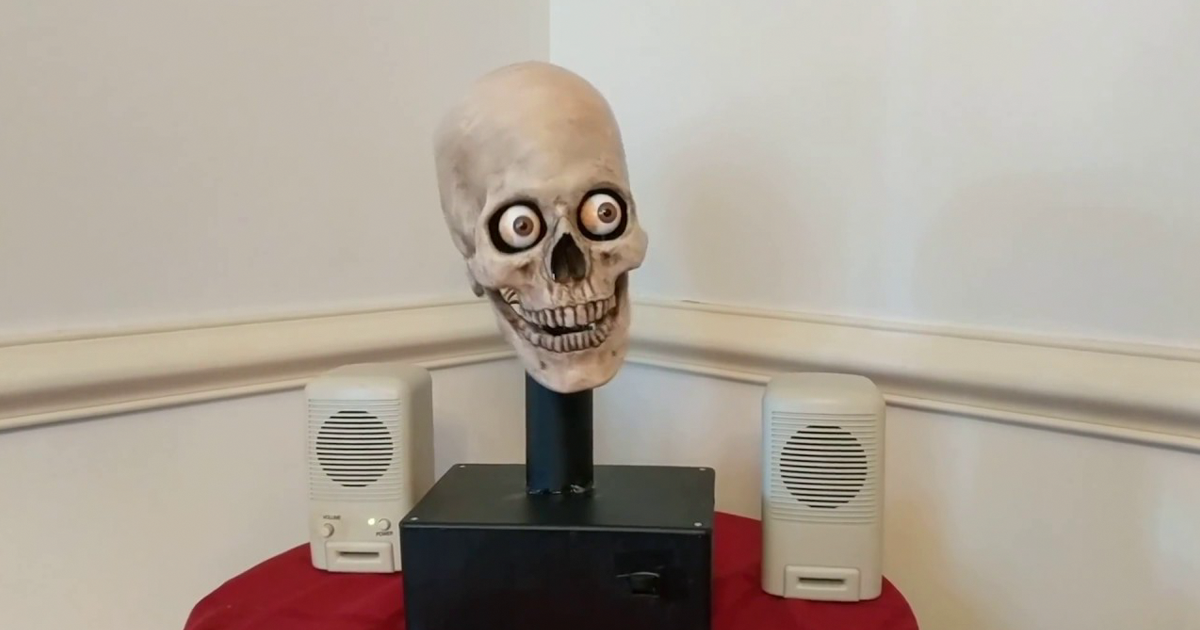
Most people ask Alexa for the weather, a timer, or a playlist. Maker Mike McGurrin looked at the same polite digital assistant and apparently thought, “This would be better if it emerged from the moving jaws of a human skull.” That wonderfully questionable idea became the Yorick Project, an Alexa-powered animatronic skull that resembles the receptionist at a haunted castle.
The project went viral because it sits at the intersection of clever engineering and unnecessary terror. Alexa still answers familiar questions in her calm voice. The difference is that the voice comes from a skull that moves its jaw, shifts its eyes, nods, and turns toward the speaker as though deciding whether a weather request is worthy of prophecy.
Behind the horror-show presentation is a thoughtful maker project involving a Raspberry Pi, servo controllers, audio processing, cloud voice services, and a repurposed Halloween prop. Here is how the Alexa talking skull worked, why it felt so unsettling, and what DIY builders can learn from it.
Meet Yorick, the Alexa-Powered Talking Skull
McGurrin, who described himself as an aspiring roboticist, already enjoyed creating talking skeletons for Halloween. His wife gave him a three-axis animatronic skull for Christmas in 2015, allowing him to upgrade from a simpler prop with only a moving jaw. The new skull could turn, tilt, nod, and move its eyesenough mechanical personality to become either a theatrical character or the last thing you see before the lights fail.
A friend suggested that such an elaborate prop deserved a job during the other 364 days of the year. Around the same time, makers were experimenting with putting Alexa into novelty objects, including a Big Mouth Billy Bass wall fish. McGurrin applied the concept to his skull and named it Yorick, after the famous skull in Shakespeare’s Hamlet.
The literary Yorick was a court jester. The robotic Yorick is less “infinite jest” and more “your smart home has become self-aware.” Still, the name fits: it is theatrical, nerdy, and just pretentious enough for a skull that can announce the temperature.
How the Alexa Skull Hack Worked
Yorick was not merely an Amazon Echo hidden inside a plastic head. McGurrin built a custom voice-assistant system around a Raspberry Pi and used separate electronics to coordinate the skull’s movements with Alexa’s responses.
A Raspberry Pi Became the Brain
The original build used a Raspberry Pi 3 Model B running AlexaPi, open-source software that turned the small computer into a client for the Alexa Voice Service. A USB microphone captured commands, while an internet connection sent requests to Amazon’s service and returned Alexa’s spoken response.
Anyone recreating the project today should treat the 2017 instructions as a historical blueprint, not a guaranteed plug-and-play guide. The original AlexaPi repository was later archived, and authentication systems, APIs, operating systems, and dependencies have changed. A modern version may require a currently supported voice platform or a custom combination of speech recognition, language processing, and text-to-speech tools.
Audio Made the Jaw Speak
An audio servo controller monitored Alexa’s output and converted changes in the sound signal into jaw movement. When Alexa spoke, the mouth opened and closed in rough synchronization with the volume and rhythm of her voice.
This amplitude-based approach is common in animatronics because it creates a convincing effect without animating every syllable. It is not movie-studio facial capture, but a skull has no lips to expose the shortcut. The jaw only needs to flap convincingly enough for the brain to conclude, “Yes, unfortunately, that skeleton is talking.”
Servos Controlled the Head and Eyes
A Pololu 12-channel Maestro servo controller handled nodding, turning, tilting, and eye movement. AlexaPi provided status signals through Raspberry Pi GPIO pins to show when the assistant had heard the wake word, was listening, was processing, or was speaking. McGurrin connected those signals to the Maestro controller, where a custom script triggered movement routines.
That extra motion made Yorick feel like a character rather than a speaker enclosure. A stationary skull is an object. A skull that becomes alert when addressed appears to notice you, and the human nervous system is remarkably willing to panic before reviewing the wiring diagram.
The Supporting Hardware
The build also used powered speakers, a microphone, a PVC support, a project box, and optional LEDs. These unglamorous details matter. Stable mounting, safe power distribution, cable strain relief, and access to an emergency switch are essential when several motors may move at once.
Why the Talking Skull Is So Disturbing
The horror does not come from the skull alone. Halloween stores have sold plastic skeletons for decades, and most are about as threatening as patio furniture. Yorick becomes unsettling because it combines a familiar humanlike voice with a face that is recognizably human but visibly dead.
Alexa’s calm delivery normally signals convenience. She tells you that a timer is finished or rain is expected at 4 p.m. When the same voice emerges from skeletal jaws, the sentence remains harmless, but the body delivering it suggests forbidden prophecy.
There is also a powerful mismatch between voice and form. Alexa sounds warm, controlled, and corporate. Yorick looks as though he has been waiting beneath a crypt since the Middle Ages. Add moving eyes and a head that turns toward the speaker, and people instinctively assign attention and intention to the machine.
That reaction demonstrates a basic principle of robotics: physical movement changes how people interpret software. Give a voice assistant a light ring and it feels like an appliance. Give it eyes, a neck, and a moving jaw, and it suddenly seems to have opinions about your shopping list.
What the Yorick Project Teaches Makers
Reuse Is a Form of Creativity
McGurrin did not invent every component. The skull already had expressive mechanics. Raspberry Pi supplied computing and network access. Alexa provided speech services. The audio board created jaw movement, and the servo controller managed the performance. The originality came from connecting proven parts in a new way.
Small Motions Create Strong Personality
The project did not need realistic facial animation. A head turn, eye shift, and jaw movement were enough to create presence. The same principle applies to museum exhibits, educational robots, puppets, toys, theme-park figures, and accessibility tools. A little synchronized motion can make a digital system easier to understandand much harder to ignore.
Imperfection Can Help
Hobby servos hum, linkages click, and hinges squeak. Those sounds would be flaws in a polished home robot. In a haunted skull, they become atmosphere. The slight mechanical strain makes Yorick seem old, restless, and perhaps overdue for a calcium supplement.
Could You Build a Talking Alexa Skull Today?
Conceptually, yes, although the software path would differ from the original. A current build could use a Raspberry Pi or similar computer, a microphone, an amplifier and speaker, an animatronic skull, one or more servos, and software that exposes clear listening, processing, and speaking states.
Begin With One Moving Jaw
Start with a single servo and map audio loudness to a conservative jaw range. Once the mouth responds reliably, add eye or head movement one axis at a time. Building everything at once makes troubleshooting difficult. When the skull stares at the ceiling while grinding its teeth, you want to know whether the cause is wiring, calibration, code, or demonic possession. Three of those have documentation.
Protect the Mechanism
Set safe minimum and maximum positions for every servo. A motor can travel farther than a plastic linkage allows, leading to stripped gears, bent rods, overheated hardware, or cracked parts. Keep fingers away from moving joints and include an accessible physical power switch.
Prevent Audio Feedback
A microphone placed near a speaker may capture Alexa’s response, cause false activations, or create feedback. Separate the microphone and speaker, manage volume, consider directional input, and mute listening while the device speaks. Otherwise, Yorick may answer himself and begin the least productive meeting in smart-home history.
Privacy and Security: The Less Funny Nightmare
A voice assistant in a skull raises the same privacy questions as one in a conventional smart speaker. Echo-class devices monitor local audio for a wake-word pattern and, after activation, send a request to cloud services for processing. Accidental activations can happen when speech, television, or other audio resembles the wake word.
Users should review voice-history and data-retention settings, secure the linked account, restrict purchasing features, and understand which third-party skills are enabled. A clearly labeled microphone-off control is essential. On supported Echo devices, physically disabling the microphones prevents voice interaction until they are switched back on.
DIY hardware adds responsibility. Credentials should never be hard-coded into public files. Unsupported software should not be left exposed on a home network. Operating systems and dependencies need maintenance, and visual indicators should make it obvious when the microphone is active. Illuminated eyes can serve that purpose while also making the device look 40 percent more cursed.
Why Yorick Still Matters
Yorick appeared while voice assistants were rapidly entering American homes, and it captured both the excitement and unease surrounding them. The project made an invisible process visible. Listening became a head turn. Processing became a pause. Speech became a moving jaw.
That is why the project remains memorable after its original hardware and software stopped being new. It is a compact lesson in human-computer interaction: presentation changes perception. The same cloud service feels completely different when embodied in a face.
It also represents the best side of hobby robotics. The build was playful, documented, modular, and inventive. It encouraged makers to imagine voice systems inside creatures, puppets, statues, exhibits, and Halloween displays. The skull simply had better cheekbones than most prototypes.
Living With a Talking Skull: A First-Person-Style Experience
Imagine placing a Yorick-style skull in a home office. During the first hour, little work gets done because every sensible request becomes theatrical. You ask for a timer, the skull swivels toward you, its eyes shift, and its jaw clacks through the answer. A five-minute tea reminder suddenly sounds like a deadline imposed by an immortal warden.
The novelty is strongest when the request is painfully ordinary. “What is the weather?” becomes an audience with an oracle. “Add paper towels to my list” sounds like preparation for an occult ceremony. When the skull confirms the request, you briefly wonder whether the list is going to your phone or being carved into a stone tablet below the house.
Guests provide the best reactions. Even people who understand that it is an animatronic prop tend to lean backward when it turns toward their voice. A moving jaw is funny; eyes that track the room create a different level of discomfort. Someone will inevitably ask whether it operates while everyone is asleep. The correct response is “no,” delivered after an unnecessarily long pause.
Daily use would reveal the less glamorous reality. Servos require calibration, linkages loosen, and audio levels that work in silence may fail when music is playing. The microphone may miss a command, leaving the skull frozen in a listening pose as though it has just heard a secret. Restarting it means explaining that the ancient talking head is installing updates.
The mechanical noises become part of its personality. A faint whine before a head turn acts like a warning. A squeaky jaw makes short answers funnier and long answers increasingly desperate. If Yorick reads a detailed forecast, it may appear personally exhausted by meteorology.
After several days, the fear would fade, but awareness would remain. A conventional smart speaker blends into a countertop. Yorick cannot blend into anything. Its visible microphone, moving face, and listening posture constantly remind users that a networked computer is waiting for a command. In that odd sense, the creepy body may make the technology more transparent than a friendly fabric-covered cylinder.
The most memorable moment would arrive late at night. The room is quiet, and a television character says something resembling the wake word. Yorick lifts its head. The eyes move. The jaw opens and delivers an irrelevant answer to nobody. The rational explanationfalse activationis obvious, but rational explanations are famously slow runners.
That mixture of useful tool, kinetic sculpture, and jump-scare machine is the real appeal. The skull does not need to be flawless. It only needs to respond convincingly enough that people begin addressing it like a character. Once someone thanks a plastic cranium for setting a timer, the project has succeeded.
Final Thoughts
Mike McGurrin’s Yorick Project transformed Alexa from an invisible household assistant into embodied comic horror. By combining a Raspberry Pi, AlexaPi, audio-driven jaw control, programmable servos, and a three-axis skull, he created something technically impressive and emotionally confusing.
The project is funny because the technology works, and frightening for the same reason. Yorick listens, reacts, and speaks with enough coordination to trigger the human habit of seeing intention in movement. Would a talking skull improve the average smart home? Probably not. Would it make checking the weather more dramatic? Absolutely. Just install a microphone-off switchand never ask it how you are going to die.

