
Makeup
The Quirky Peripherals In Medical PC Setups
Jul
Walk into a modern exam room, nurses’ station, operating suite, imaging center, or hospital pharmacy and you will see something that looks familiar at first: a computer. But look closer. That innocent medical PC setup is rarely just a monitor, keyboard, and mouse. It may be wearing a waterproof keyboard like a raincoat, holding a barcode scanner like a grocery store with a medical degree, listening through a dictation microphone, reading badges, printing wristbands, authenticating staff, and rolling around on a cart that looks ready to enter a small robot parade.
Medical computing is full of strange-looking peripherals because healthcare is not a normal office environment. A clinic workstation must survive disinfectants, glove-covered fingers, frantic shift changes, patient privacy rules, medication checks, limited space, and the occasional cup of coffee placed somewhere it absolutely should not be. In other words, quirky peripherals in medical PC setups are not gimmicks. They are practical tools designed for safety, speed, hygiene, documentation, and fewer “whoops, wrong chart” moments.
This article explores the weird, wonderful, and surprisingly important accessories attached to medical computersand why these odd little devices matter more than they first appear.
Why Medical PC Setups Look So Different
In a typical office, the biggest keyboard problem might be crumbs from a sandwich. In healthcare, a keyboard may be touched after patient contact, near specimens, beside medication carts, or in rooms where cleaning protocols matter deeply. That is why medical PC peripherals are often built with sealed surfaces, antimicrobial materials, smooth edges, washable designs, and compatibility with hospital-grade disinfectants.
Medical PCs also support workflows that are more complex than writing emails or updating spreadsheets. A single workstation may help a clinician verify a patient’s identity, review lab results, document a visit, scan medication, capture a signature, print a specimen label, open an imaging study, and securely log out before the next user arrives. The result is a setup that may look eccentric but is actually a carefully assembled clinical command center.
The Washable Keyboard: The Celebrity of Medical Oddities
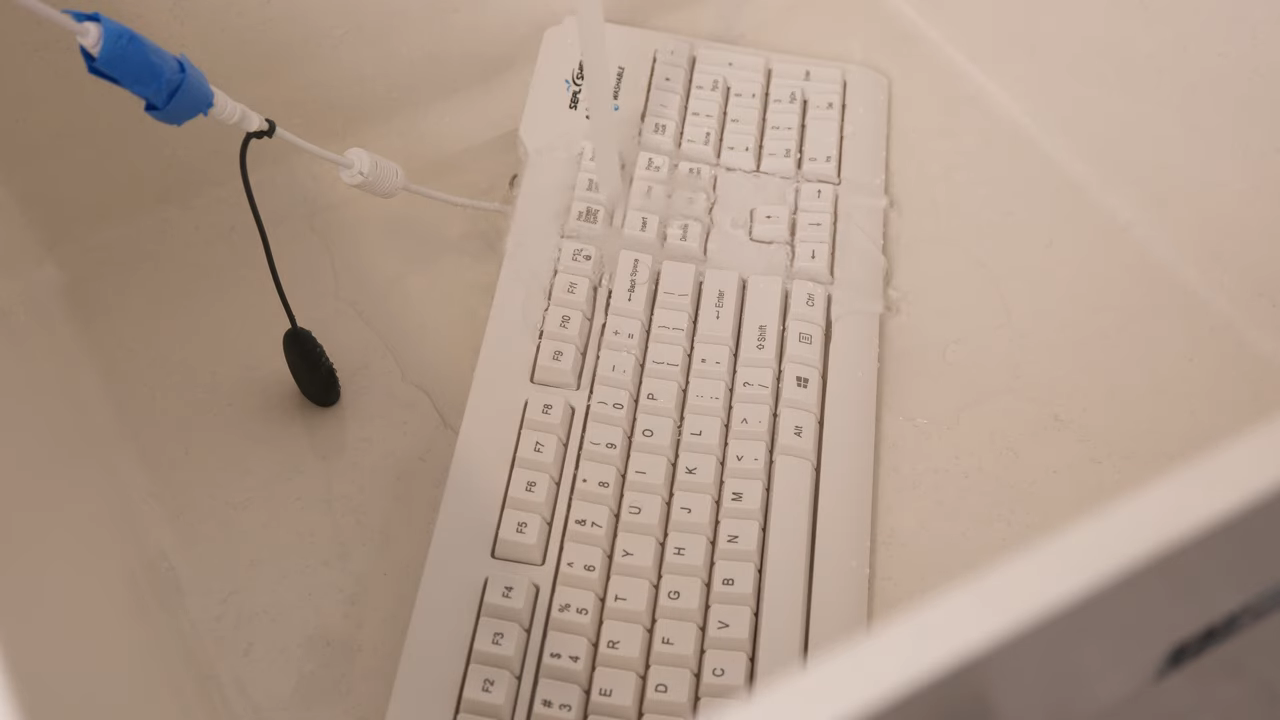
If medical peripherals had a red carpet, the washable keyboard would arrive first, wearing a silicone suit and asking everyone to sanitize their hands before applause. Unlike standard office keyboards, which have tiny gaps that seem designed to collect dust, hair, and mysteries from 2017, medical-grade keyboards often use sealed construction. Some are flat, flexible, and wipeable. Others have low-profile keys with protective membranes. Many are designed so staff can lock the keys temporarily during cleaning without accidentally typing “jjjjjjjjjj” into a patient note.
The reason is simple: keyboards are high-touch surfaces. In healthcare settings, frequently touched equipment must be easy to clean, and traditional keyboards can be difficult to disinfect thoroughly. A sealed keyboard helps reduce the number of cracks where contaminants can hide. It also helps IT teams avoid replacing damaged consumer keyboards after repeated exposure to disinfecting wipes.
What Makes a Medical Keyboard Different?
A medical keyboard may include waterproof or water-resistant construction, sealed seams, chemical-resistant surfaces, antimicrobial additives, backlighting for low-light areas, integrated touchpads, and key-lock cleaning modes. Some models are rigid and feel close to a normal keyboard. Others feel like typing on a very responsible pancake. The best choice depends on the setting: an administrative desk may not need the same keyboard as an operating room, isolation room, dental operatory, or emergency department cart.
The Medical Mouse: Small, Smooth, and Surprisingly Serious
The medical mouse is the keyboard’s quieter sibling. It looks simple, but it solves a real problem: standard mice have scroll wheels, seams, grooves, and textured areas that are annoying to clean. Medical mice often replace the scroll wheel with touch scrolling or sealed buttons. Some are fully wipeable, some are waterproof, and some can be disinfected without unplugging them.
In busy clinical spaces, a mouse must work with gloved hands, tolerate frequent cleaning, and avoid becoming a tiny plastic hotel for germs. That is a lot to ask from something that normally spends its life clicking “OK” and judging your posture.
Barcode Scanners: The Beep That Means Business
Few peripherals define healthcare computing better than the barcode scanner. It may look like a retail tool, but in medical settings it becomes a patient safety device. Barcode medication administration systems typically involve scanning a patient wristband and scanning medication packaging to help verify the right patient, medication, dose, route, and time. That familiar beep can represent a critical checkpoint in the care process.
Barcode scanners are also used for lab specimens, blood products, supply tracking, pharmacy workflows, equipment management, and inventory control. In a hospital, the humble barcode scanner may travel from bedside to medication room to laboratory, quietly preventing chaos while sounding like a checkout lane with better credentials.
Why Scanners Need to Be Tough
Medical scanners must handle drops, disinfectants, constant use, and awkward angles. Staff may scan wristbands on sleeping patients, curved medication packages, tiny vials, specimen tubes, or labels under plastic. A scanner that works beautifully in a warehouse may become a drama queen at the bedside if it cannot read damaged labels, curved surfaces, or low-contrast codes.
RFID Readers: The Invisible Handshake
Radio-frequency identification readers are another quirky addition to some medical PC setups. Unlike barcode scanners, RFID readers do not always require direct line of sight. They may be used for patient identification, staff badges, medication tracking, asset management, surgical instrument tracking, or locating mobile equipment.
RFID can feel slightly magical: wave a badge, tap a tag, and the system recognizes something without the dramatic laser-beam performance of a barcode scanner. But it also requires careful planning. Healthcare environments contain metal equipment, liquids, crowded rooms, and many devices competing for space. RFID works best when it is matched to a specific workflow rather than sprinkled around like technological glitter.
Dictation Microphones: Because Clinicians Cannot Type Forever
Medical documentation can be time-consuming, and many clinicians use dictation microphones with speech recognition software to create notes faster. These microphones may include programmable buttons for starting dictation, navigating templates, inserting standard phrases, or controlling playback. Some are handheld. Others are mounted. Some look like regular microphones; others resemble a TV remote that went to medical school.
Dictation peripherals are especially useful in specialties with heavy documentation demands, such as radiology, pathology, cardiology, orthopedics, and primary care. When speech recognition works well, it can reduce typing burden and help clinicians document more naturally. When it works poorly, it can produce hilarious errors that must be corrected before they become part of the medical record. Nobody wants “patient denies chest pain” transformed into “patient denies chess plane.”
Foot Pedals: The Unsung Heroes Under the Desk
Foot pedals are delightfully odd because they make a computer feel like a sewing machine, a piano, and a medical device had a very practical baby. In healthcare, foot pedals can control dictation playback, imaging software, transcription, surgical systems, dental equipment, or hands-free navigation. They are especially valuable when hands are occupied, gloved, sterile, or simply tired of doing everything.
A radiologist may use a pedal to move through audio or images. A transcriptionist may use one to pause and rewind dictation. A surgeon or procedural specialist may use foot controls to avoid touching nonsterile equipment. Foot pedals prove that sometimes the best interface is not another button on the screenit is a button on the floor.
Signature Pads: The Digital Clipboard That Refuses to Retire
Despite all the talk about paperless healthcare, signatures still matter. Consent forms, financial documents, privacy acknowledgments, release forms, and intake paperwork often require patient signatures. Signature pads connect to medical PC setups so patients can sign electronically without printing, scanning, or losing yet another sheet of paper to the front-desk abyss.
Some pads include small screens that display the document or signature field. Others are simple writing surfaces. The quirkiness comes from their location: they often sit at registration desks, attached by a cable that has clearly survived several years of patients trying to pick up the entire device like a clipboard.
Smart Card Readers and Badge Taps: Fast Access Without Password Gymnastics
Healthcare workers move quickly between workstations. Requiring a long password every single time can slow care, encourage poor habits, or lead to sticky-note disasters. Smart card readers, proximity badge readers, and tap-and-go authentication systems can help clinicians access systems faster while supporting security policies.
These peripherals are especially useful in shared environments such as nurses’ stations, emergency departments, medication rooms, and mobile carts. The goal is not merely convenience. It is to balance speed with accountability. Every chart access, medication action, or order entry should be tied to the correct user. Badge-based login tools help reduce friction without turning security into a daily obstacle course.
Biometric Devices: Fingerprints, Faces, and Clinical Reality
Biometric peripherals can include fingerprint readers, palm scanners, facial recognition cameras, or vein-pattern devices. They can help with authentication, patient identification, medication dispensing, or controlled access. In theory, biometrics are wonderfully simple: you are your password. In practice, healthcare adds complications. Gloves, hand sanitizer, masks, lighting conditions, mobility limitations, privacy policies, and infection-control needs all affect whether biometrics make sense.
A fingerprint reader may work beautifully in an office but struggle when staff wear gloves or have wet hands. Facial recognition may be convenient but must be evaluated carefully in clinical areas where masks, positioning, and privacy concerns are common. Like many medical PC peripherals, biometrics are not automatically good or bad. They are workflow-dependent.
Medical Label Printers: Tiny Machines With Big Responsibility
Label printers may not look exciting, but in healthcare they are deeply important. They generate wristbands, specimen labels, medication labels, file labels, asset labels, and shipping labels for lab work. A label that is readable, durable, and correctly matched to the patient can help prevent errors. A label that smears, peels, fades, or prints the wrong information can create headaches that are much larger than the printer itself.
That is why medical PC setups often include compact thermal printers or wristband printers close to the point of care. In laboratories, emergency departments, and admissions areas, label printers are not accessories. They are part of the safety chain.
Touchscreens: Finger-Friendly, Glove-Friendly, and Occasionally Moody
Touchscreens are common in medical PCs, kiosks, imaging systems, medication cabinets, and bedside terminals. They save space and make navigation faster. They can also be sealed more easily than traditional keyboards, which is useful where cleaning matters. However, touchscreens must be selected carefully for glove compatibility, wet-touch performance, brightness, viewing angle, and durability.
A touchscreen that refuses to cooperate with nitrile gloves is not a touchscreen. It is a flat rectangle with trust issues. In medical environments, touch performance must be reliable under real clinical conditions, not just in a sunny product demo.
Privacy Screens: The Low-Tech Defender of Patient Information
Some quirky peripherals are not electronic at all. Privacy filters or privacy screens limit side-angle viewing, helping protect patient information in hallways, registration areas, shared workstations, and mobile carts. They are simple, but they matter. Medical PCs often display protected health information, and the screen may be visible to visitors, other patients, vendors, or anyone walking by with curious eyes and no business knowing Mr. Johnson’s lab results.
Privacy screens do not replace good security practices, automatic screen locking, or thoughtful workstation placement. But they are a practical layer of defense, especially in cramped clinical spaces where perfect layout is a fantasy and the printer is somehow always in the wrong spot.
Camera Attachments and Telehealth Accessories
Telehealth and hybrid care have brought more cameras, microphones, speakerphones, ring lights, document cameras, and headset systems into medical PC setups. A primary care office may use a webcam for virtual visits. A specialty clinic may use document cameras to share forms, images, or medication packaging. A hospital may use video carts for interpreter services, remote consultations, or patient communication.
These devices can improve access and communication, but they also introduce practical concerns: camera placement, sound quality, patient consent, secure platforms, cleaning, and cable management. Nothing says “high-tech healthcare” like a physician beginning a virtual visit while trying to figure out why the webcam is showing only the ceiling tile.
Medical Carts, Arms, and Mounts: Peripherals for the Peripherals
Strictly speaking, carts and monitor arms are not classic computer peripherals, but they shape the entire medical PC experience. Workstations on wheels, wall-mounted arms, adjustable monitor mounts, keyboard trays, scanner holders, battery packs, and cable organizers make the setup usable in real clinical spaces.
A well-designed medical cart can bring the EHR to the bedside, support barcode scanning, store supplies, power devices, and adjust to different users. A poorly designed cart becomes a hallway obstacle with a monitor. Ergonomics matter because clinicians may use these systems for hours. Screen height, keyboard position, reach distance, wheel quality, battery life, and cleanability all affect whether the setup helps or quietly annoys everyone on the shift.
Medical-Grade Power Accessories: The Least Funny, Most Important Gear
Power supplies, isolation transformers, medical-grade power strips, battery packs, and network isolators may not be visually exciting, but they are essential in patient-care areas. Medical electrical equipment must meet safety requirements appropriate to its intended environment. In many setups, especially near patients, power accessories must address leakage current, grounding, isolation, electromagnetic compatibility, and safe operation.
This is where “just plug it in” becomes “please involve biomedical engineering before someone creates a rolling cable octopus.” Healthcare IT teams, facilities staff, and clinical engineering departments often work together to decide what can be connected, where it can be used, and how it should be maintained.
Why Quirky Does Not Mean Random
The strange mix of peripherals in medical PC setups exists because healthcare workflows are physical, digital, and human all at once. A clinician is not just entering data; they are caring for a person, following safety checks, preventing infections, protecting privacy, and moving through a fast-changing environment. The peripherals support those tasks.
A barcode scanner supports medication safety. A washable keyboard supports infection control. A badge reader supports secure access. A label printer supports specimen tracking. A foot pedal supports hands-free operation. A privacy filter supports confidentiality. A cart supports mobility. Together, they form a practical ecosystem.
How to Choose the Right Medical PC Peripherals
Choosing peripherals for a medical PC setup should begin with the workflow, not the catalog. The best question is not “Which device looks impressive?” but “What problem must this workstation solve?” An emergency department registration desk, an ICU bedside cart, a radiology reading room, a dental operatory, and a laboratory accessioning station all need different tools.
Key Factors to Consider
Cleanability should be near the top of the list. If a device will be touched often or used near patient care, it must tolerate the facility’s cleaning products and schedule. Durability also matters because healthcare peripherals are handled by many users across long shifts. Compatibility with EHR software, barcode formats, authentication systems, device drivers, operating systems, and security policies should be verified before purchase.
Ergonomics deserves serious attention. A peripheral that saves five seconds but causes wrist strain, awkward reaching, or repeated bending may not be a win. Security is another major factor. Devices should support user accountability, protected health information safeguards, and appropriate access controls. Finally, support and replacement planning matter. A quirky peripheral is charming until it breaks and nobody knows where the spare cable is.
Common Mistakes in Medical PC Setups
One common mistake is using consumer-grade peripherals in clinical areas where frequent disinfection is required. The device may be cheap at first, but if it cracks, fades, fails, or cannot be cleaned properly, it becomes a false economy. Another mistake is adding too many devices without considering workflow. A workstation with a scanner, printer, camera, microphone, card reader, foot pedal, headset, and three mystery dongles may look powerful, but it can become confusing if staff are not trained.
Cable management is another underrated issue. Medical environments are full of movement. Cables can snag, collect dust, interfere with cleaning, or create trip hazards. Wireless devices may reduce clutter but introduce charging, pairing, battery, and security considerations. No option is perfect; the goal is controlled imperfection.
The Future: More Sensors, Less Friction
Medical PC peripherals are likely to become smarter, smaller, and more integrated. Expect more contactless authentication, improved voice input, better barcode and RFID workflows, advanced telehealth accessories, AI-supported documentation tools, and cleaner hardware designs. The future medical workstation may have fewer visible gadgets because more functions will be built into the screen, cart, camera, or software.
Still, healthcare will always need physical tools. Patients wear wristbands. Medications need labels. Staff need secure access. Specimens must be tracked. Rooms must be cleaned. The quirky peripherals may evolve, but they will not disappear. They are the little bridges between the digital chart and the very real patient in the room.
Real-World Experiences With Quirky Medical PC Peripherals
Anyone who has spent time around medical workstations knows that the peripherals develop personalities. The barcode scanner is usually the loudest member of the team. When it works, it gives a cheerful beep that says, “Yes, I have confirmed reality.” When it does not work, it silently accuses everyone of holding the wristband at the wrong angle. Nurses learn scanner tricks the way chefs learn knife skills: tilt the wrist, flatten the band, avoid glare, try again, and do not let the machine sense fear.
Washable keyboards create another memorable experience. The first time someone uses a fully sealed silicone keyboard, the reaction is often a mix of admiration and suspicion. It feels different from a standard keyboard, and the keys may require a slightly new typing rhythm. But after watching a keyboard survive repeated wiping, splashes, glove contact, and daily clinical use, the design begins to make sense. It may not win a mechanical-keyboard beauty contest, but it will not panic when disinfectant appears.
Badge readers can be loved or blamed depending on the day. When tap-and-go login works smoothly, it feels like magic. A clinician taps a badge, opens the correct session, documents quickly, and moves on. When authentication fails, the same badge reader becomes a tiny gatekeeper with a superiority complex. Still, compared with typing complex passwords dozens of times per shift, fast authentication can be a major relief.
Label printers are another source of both gratitude and comedy. In admissions, labs, and medication areas, these little printers produce the tags that keep patients, samples, and supplies connected to the right records. But they also have moods. Labels can jam, rolls can be inserted backward, and someone always discovers the printer is empty exactly when the waiting room is full. A well-maintained label printer is practically invisible; a neglected one becomes the villain of the morning.
Foot pedals tend to surprise people the most. They sit under desks or procedure stations, quietly extending the user interface to the floor. For transcription, imaging, dictation playback, or hands-free control, they can be wonderfully efficient. But they also require thoughtful placement. Put a pedal too far away and users stretch awkwardly. Put it too close and someone may activate it accidentally. The humble foot pedal proves that ergonomics includes everything from fingertips to toes.
Telehealth accessories have added a new layer of practical lessons. A webcam mounted too low creates the famous “nostril consultation.” A microphone too far away makes the clinician sound like they are speaking from a cave. A camera facing a bright window turns the provider into a mysterious silhouette. The best telehealth setup is not necessarily expensive; it is positioned well, reliable, cleanable, and easy to use without turning every visit into an audio-visual troubleshooting session.
The biggest lesson from real medical PC setups is that small peripherals can have big effects. A scanner that reads quickly can reduce frustration. A cleanable keyboard can support safer routines. A privacy screen can prevent accidental exposure of sensitive information. A reliable microphone can save documentation time. A sturdy cart can make bedside charting practical instead of painful. These accessories may look quirky, but they often determine whether technology fits into care or gets in the way.
In the end, the best medical PC setup is not the one with the most gadgets. It is the one where every peripheral earns its spot. The keyboard can be cleaned. The scanner works at the bedside. The printer produces readable labels. The login process is secure but not maddening. The cables are controlled. The screen is positioned properly. The system supports the clinician instead of demanding constant attention. That is the quiet genius of quirky medical peripherals: when chosen well, they make complicated care feel a little smoother.
Conclusion
The quirky peripherals in medical PC setups may look unusual, but each one tells a story about healthcare’s real-world demands. Hospitals and clinics need computers that can be cleaned, moved, shared, secured, and connected to patient-care workflows. That is why medical workstations collect washable keyboards, sealed mice, barcode scanners, RFID readers, badge taps, label printers, dictation microphones, foot pedals, privacy filters, telehealth cameras, and medical-grade power accessories.
These tools are not decorative extras. They help reduce errors, protect patient information, support infection-control routines, improve documentation, and make clinical work more efficient. A medical PC setup is not just a computer in a white coat. It is a carefully equipped workstation built for one of the most demanding environments in the world. And yes, it may beep, roll, scan, sanitize, authenticate, print, and occasionally refuse to recognize a barcode until you tilt it exactly right. That is healthcare technology: serious mission, quirky personality.
Note: This article is an original, plagiarism-free synthesis based on real healthcare IT, infection-control, patient-safety, ergonomics, and medical-device practices commonly referenced by reputable U.S. healthcare organizations and industry sources.

