
Hair Care
How to Send an Email to a Cell Phone: 6 Quick Steps
Aug
Sending an email to a cell phone sounds like something from the flip-phone era, right between “burn a CD” and “ask Jeeves.” But the trick still matters. Maybe your phone is dead, your laptop keyboard is faster, your team uses email alerts, or you simply want to send a short text message without picking up your mobile device. The basic idea is simple: you send an email to a special carrier address, and the mobile carrier converts it into an SMS or MMS message.
Here is the catch: email-to-text is not as universal as it used to be. Several U.S. carriers have reduced, filtered, or retired old public email-to-SMS gateways because they were abused by spammers. In 2026, the method can still work in some situations, but it is no longer something you should treat like a guaranteed emergency system. Think of it as a useful pocket tool, not a fire alarm.
This guide explains how to send an email to a cell phone in six quick steps, how SMS and MMS gateways work, which details to double-check, and what to do when your message vanishes into the digital Bermuda Triangle.
What Does “Send an Email to a Cell Phone” Mean?
When people say they want to email a cell phone, they usually mean one of two things. First, they may want to send a normal email that the recipient reads in a mobile email app like Gmail, Outlook, Apple Mail, or Yahoo Mail. That is just regular email, and the recipient needs an email address.
Second, and more interestingly, they may want to send an email that arrives as a text message. This is called email-to-text, email-to-SMS, or email-to-MMS. Instead of typing the recipient’s email address, you type the person’s 10-digit mobile number followed by the correct carrier gateway domain. For example, a legacy Verizon SMS address looked like this:
If the gateway accepts the message, the email body becomes a text on the recipient’s phone. The subject line may appear at the beginning, may be ignored, or may make the message look awkwardbecause email and SMS were not exactly born as twins. More like distant cousins who only meet at family weddings.
How to Send an Email to a Cell Phone: 6 Quick Steps
Step 1: Confirm the Recipient’s Mobile Number
Start with the full 10-digit U.S. phone number, including the area code. Remove spaces, dashes, parentheses, and decorative punctuation. Your email address should use numbers only before the gateway domain.
For example, convert this:
Into this:
This sounds basic, but many failed email-to-text attempts begin with a tiny formatting mistake. Carriers do not reward creativity here. A misplaced dash can turn a practical message into a tiny undelivered ghost.
Step 2: Find the Recipient’s Wireless Carrier
To send an email as a text message, you usually need to know the recipient’s mobile carrier. Verizon, T-Mobile, AT&T, Cricket, UScellular, Google Fi, and other carriers use different gateway domains, and some have changed or discontinued service.
The easiest option is to ask the recipient, “Which carrier are you on?” If that feels too formal, blame technology. Everyone understands that technology occasionally needs a permission slip.
You can also use a carrier lookup tool, but remember that lookup results may be wrong if the number was ported from one carrier to another. In the United States, people can keep the same phone number when switching networks, which is great for humans and mildly annoying for gateway guessing.
Step 3: Choose the Correct SMS or MMS Gateway
An SMS gateway is for plain text. An MMS gateway is for longer messages, images, or multimedia. In practice, if you only need to send a short message such as “Running 10 minutes late,” use SMS. If you need to send a photo, a long message, or richer content, MMS may be more appropriatewhen supported.
Here are examples of common U.S. carrier gateway formats that have been widely used, along with important 2026 reality checks:
| Carrier | SMS Format | MMS Format | Current Practical Note |
|---|---|---|---|
| Verizon | number@vtext.com | number@vzwpix.com | Verizon has begun shutting down legacy email-to-text and expects completion by March 31, 2027. Delivery may fail before then. |
| AT&T | number@txt.att.net | number@mms.att.net | AT&T shut down email-to-text and text-to-email service on June 17, 2025. |
| T-Mobile | number@tmomail.net | number@tmomail.net | May work for some low-volume plain-text messages, but filtering and reliability vary. Plain text is safest. |
| UScellular | number@email.uscc.net | number@mms.uscc.net | Availability can vary; test before relying on it. |
| Cricket Wireless | number@sms.cricketwireless.net | number@mms.cricketwireless.net | Legacy gateway behavior may vary; verify before use. |
Because carrier policies change, always verify the gateway before using it for anything important. For business, alerts, appointments, or customer communication, a dedicated SMS service or SMS API is usually more reliable than old carrier email gateways.
Step 4: Format the Email Address Correctly
Now combine the number and gateway domain. Do not include a country code, plus sign, parentheses, spaces, or punctuation unless the service specifically requests international formatting.
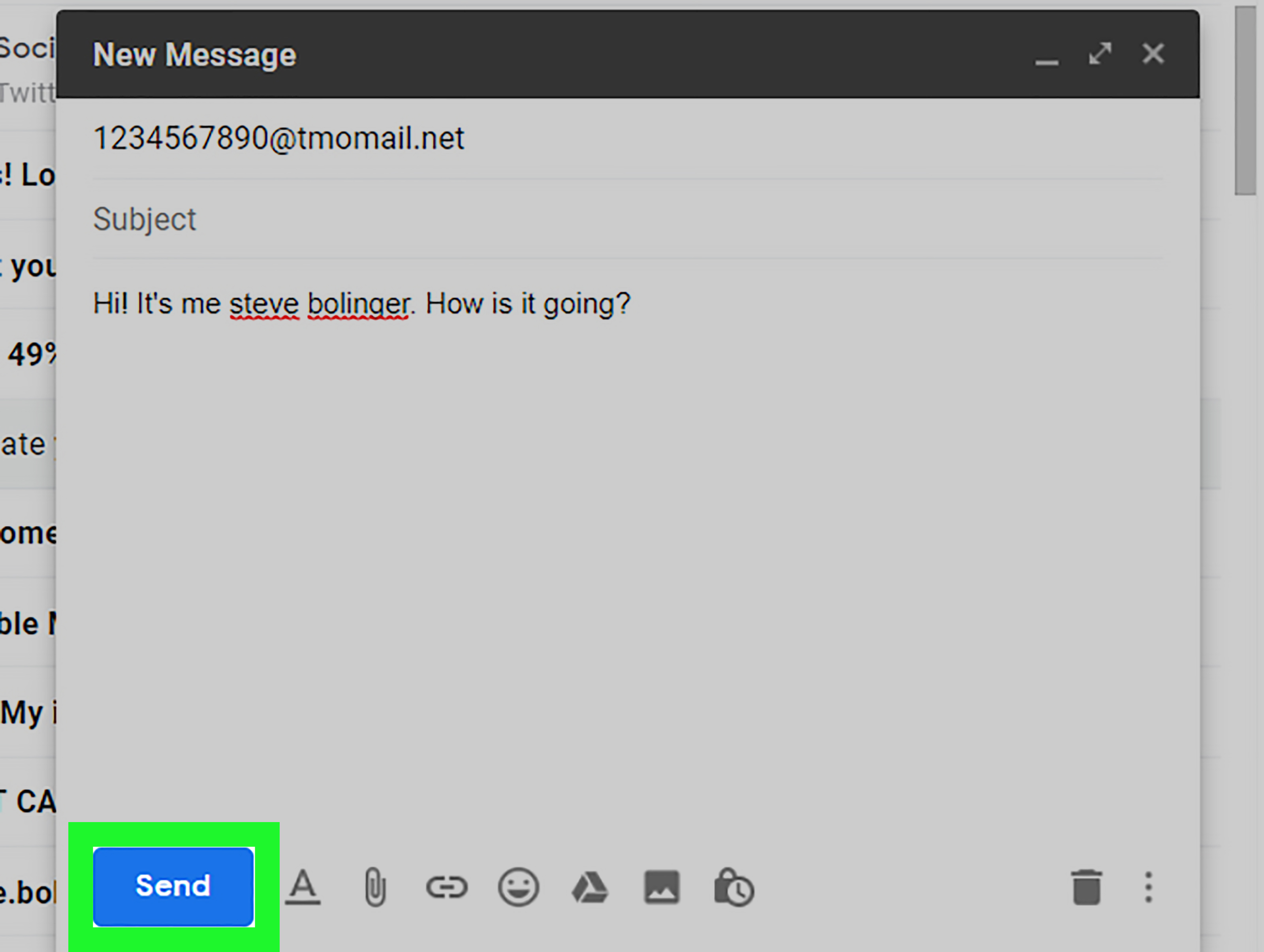
Example for a legacy T-Mobile email-to-text message:
Example for a legacy Verizon SMS message:
Example for a legacy Verizon MMS message:
If you send to the wrong gateway, the message may bounce, disappear, arrive late, or appear in a format that looks like it was assembled by a sleepy robot. Double-check the address before pressing Send.
Step 5: Write a Short, Plain-Text Message
Email gives you room to write a small novel. SMS does not. Standard SMS messages are designed around short plain-text content, traditionally up to 160 characters per segment. Longer messages may be split into multiple parts, converted to MMS, delayed, or blocked depending on the carrier.
For best results, keep your message short, direct, and boringly useful. Boring is good here. Boring gets delivered.
Good example:
Riskier example:
The second message has “spam filter snack” written all over it. Avoid link-heavy messages, all caps, excessive punctuation, attachments, promotional language, and suspicious wording. If you are contacting customers, employees, or a group, make sure you have permission and follow SMS compliance rules. Texting without consent is not clever marketing; it is how brands become blocked, reported, and spiritually escorted out of the inbox.
Step 6: Send, Test, and Watch for Replies
After sending, ask the recipient to confirm whether the message arrived. If they reply, the response may appear in your email inbox instead of your phone. Check your spam or junk folder too, because email-to-text replies sometimes look unusual to mail filters.
If the message does not arrive within a few minutes, try these quick fixes:
- Confirm the phone number and carrier.
- Remove the subject line.
- Use plain text only.
- Shorten the message to one or two sentences.
- Remove links and attachments.
- Try the MMS gateway if the SMS gateway fails.
- Use a real SMS platform if reliability matters.
For urgent communication, do not depend on email-to-text alone. Call, use a messaging app, send a normal email, or use a verified SMS service. Email-to-text can be handy, but it is not a guaranteed delivery promise wrapped in a tiny blue bubble.
SMS vs. MMS: Which One Should You Use?
SMS stands for Short Message Service. It is the classic text-message format designed for short plain-text messages. MMS stands for Multimedia Messaging Service. It supports images, longer messages, audio, video, and richer formatting, depending on the carrier and device.
When sending an email to a cell phone, choose SMS when your message is short and text-only. Choose MMS when you need to send a longer message or media. However, remember that attachments do not always survive the trip from email to phone. Some carriers strip them out. Others reject them. Some compress them until your photo looks like it was taken through a potato.
For a quick personal message, SMS is usually best. For anything complex, send a regular email or use a messaging app that handles files properly.
When Email-to-Text Works Best
Email-to-text is most useful for simple, low-volume, personal messages. It can help when your phone battery is dead, your mobile device is not nearby, or you are working from a desktop computer and need to send a short note quickly.
It can also be useful for personal reminders, small household coordination, or one-off messages to someone who prefers texts. For example, you might send:
That is a good use case: short, clear, expected, and not promotional.
When You Should Not Use Email-to-Text
Do not use old public carrier gateways for mass texting, marketing blasts, medical alerts, security alerts, school notifications, emergency messages, or business-critical communication. Many carriers are actively filtering or retiring these channels because they have been abused for spam and phishing.
If you need reliable delivery, opt-outs, reporting, compliance, templates, scheduling, two-way messaging, or message logs, use a professional SMS provider. Modern SMS platforms route messages through registered and compliant channels instead of relying on fragile public gateways.
Also, never send sensitive information through email-to-text. Messages can pass through multiple systems, and SMS itself is not ideal for confidential data. Do not send Social Security numbers, passwords, medical details, banking information, or private account codes. A text message is convenient; it is not a bank vault with emojis.
Common Problems and How to Fix Them
The Message Never Arrives
This usually means the gateway is wrong, the carrier no longer supports the service, the message was filtered, or the recipient has blocked email-to-text messages. Try a shorter plain-text message, confirm the carrier, and remove links.
The Message Arrives Late
Email-to-text is not always real time. Messages can be delayed by email servers, spam filters, carrier gateways, or network congestion. If timing matters, use a phone call or a dedicated SMS service.
The Message Looks Weird
Subject lines, signatures, logos, tracking pixels, and HTML formatting can make a text message look messy. Remove your email signature and send in plain text. That inspirational quote under your signature may be charming in email, but in a text it can turn “I’ll be there soon” into a five-screen scrollathon.
The Reply Goes to Email
That is normal. When a recipient replies to an email-to-text message, the response often returns to the sender’s email inbox. Check spam if you do not see it.
The Carrier Blocks the Message
Carriers block messages that look automated, promotional, suspicious, or unwanted. Avoid bulk behavior, links, all caps, repeated test messages, and marketing language. For business communication, use a compliant texting service.
Best Practices for Sending an Email as a Text Message
Keep the message short. Identify yourself immediately. Avoid links unless the recipient expects them. Do not send attachments unless you are using an MMS gateway and have tested it. Remove your signature. Use normal capitalization. Avoid promotional wording. Send only to people who expect to hear from you.
A strong message looks like this:
It includes the sender’s name, the key information, and a clear next step. Nobody has to decode it like a treasure map.
Alternatives to Email-to-Text
If carrier gateways fail, you still have several options. You can send a normal email to the recipient’s email address, use Apple Messages or Google Messages on a computer, try WhatsApp, Signal, Messenger, Slack, Microsoft Teams, or another app the recipient already uses.
For businesses, use an SMS marketing or transactional messaging platform. These services are built for deliverability, consent management, opt-outs, analytics, and compliance. Many also support email-to-SMS workflows, so you can still send from Gmail or Outlook while the provider handles proper SMS delivery behind the scenes.
Practical Experience: What Actually Happens in Real Life
In everyday use, sending an email to a cell phone feels wonderfully simple when it works. You type a number, add a gateway domain, write a short note, and the recipient gets a text. The first successful test has a small magic-trick quality, like discovering your toaster can also print boarding passes. But after testing the method across different situations, one lesson becomes obvious: email-to-text is convenient, not consistent.
The best results usually happen with short personal messages between people who know each other. A quick “I’m here,” “Call me when free,” or “The package arrived” has a decent chance of getting through when the carrier still supports the gateway. Messages that are plain text, under 160 characters, and free of links tend to behave better. The moment you add a long signature, a tracking link, a logo, or a dramatic subject line, delivery becomes less predictable.
Another common experience is that the sender assumes the message failed because the recipient does not reply. Later, the recipient says, “Oh, I got it, but it looked strange.” Sometimes the text shows the sender’s email address at the top. Sometimes the subject line appears before the message. Sometimes the email signature follows the message like an unwanted parade float. That is why it is smart to remove everything except the actual words you want the person to read.
Carrier changes are the biggest frustration. A gateway that worked last year may not work today. A message to one Verizon user may fail while another legacy setup still receives something. AT&T’s shutdown is a perfect example of why old instructions floating around the internet can become outdated. Many tutorials still list AT&T gateway addresses as though nothing changed. That is dangerous if you are using the method for reminders, alerts, or anything time-sensitive.
Business users often learn this lesson the hard way. A server alert that once sent email-to-text notifications at 2 AM may suddenly stop reaching the on-call technician. Nobody notices until something breaks, and then everyone gets to enjoy the traditional office sport of “Who changed the thing?” In many cases, nobody changed anything. The carrier simply filtered or retired the path.
The practical takeaway is simple: test before you trust. Send a trial message. Ask for confirmation. Keep a backup channel. If the message matters, use a real SMS provider, a phone call, or a modern messaging platform. Email-to-text is still a clever trick for quick personal communication, but for serious delivery, it should not be the only horse pulling the wagon.
Conclusion
Learning how to send an email to a cell phone is easy: confirm the number, identify the carrier, choose the right gateway, format the address, write a short plain-text message, and test delivery. The harder part is knowing when this method is appropriate. For casual, one-off messages, email-to-text can be fast and handy. For business, bulk messaging, sensitive information, or urgent alerts, use a dedicated SMS solution or another reliable communication channel.
The old email-to-SMS gateway system was clever, but the modern texting world is stricter because spam, scams, and abuse have forced carriers to tighten the gates. In other words, the tiny digital bridge between email and text still exists in places, but it now has security guards, traffic cones, and occasionally a “closed for maintenance” sign.
Note: Carrier gateway support changes frequently. Before publishing or relying on any carrier-specific gateway, verify the latest policy directly with the wireless provider, especially for AT&T, Verizon, T-Mobile, Cricket, and UScellular.

